Thursday, July 15, 2021

Khabib, whats up?

 It is out of the question - Khabib Numagomedov is the the lightweight number 1 GOAT. But now a days he has turned in to a grumpy whining machine.

Look at Conor McGregor, the guy is a hotshot, got lots of money, but did put up a show for us and ended up fracturing his leg. Instead of being a sportsman, Khabib is bitching about Conor - is there an element of fear here? 

Now, looking at one of his recent pictures, here: Watch: 66-year-old woman who stood in the heat to take a picture with Khabib Nurmagomedov meets her hero (sportskeeda.com) he has started getting out of shape and I guess he will never be back in the octagon. 

Here is where I appreciate the training, fitness, diet control and time that guys like Conor, Anderson Silva and our very own Daniel Cormier or even Jose Aldo who never want to give up.


Come on Khabib, don't bitch about guys who are trying to put their best out there.

Wednesday, December 16, 2020

So long.. Linux

 With a heavy heart I am saying bye to Linux. Unfortunately, it is not without some bitterness.

Recently, I decided to jump back to Linux from Mac. So, I sold all the Macs I got – Those were a MacBook pro 13″, a MacBook pro 15″ and a mac mini. All these machines held up strong to the test of time and served me well. They were all bought between 2011 and 2012 and worked perfectly for 8 to 9 years without any trouble. The mac mini had lost the hard drive due to the frequent power cuts in Bangalore and to my negligence of not providing a power backup.

Then I bought a few PC parts and assembled a new desktop. The hardware: Ryzen5 3500(6 cores/threads), 16GB DDR4 3000Mhz RAM, a Radeon RX 560 series graphics card and an NVME SSD. Pretty decent or more than sufficient for 2020 and far more powerful than any of the Macs I had.

First OS choice – Linux and during Feb 2020, Pop!OS was pretty popular. Downloaded and installed it. Initial impressions, super smooth and fast. Coming to the user interface – it wares very quickly and I started hating the massive thick title bars – designed for “touch” interface where there is practically no space for Pop!OS or any popular desktop Linux distros. Now you can argue that I can change the themes and install “tweaks” or directly edit the GTK CSS files. I was looking to set up a system for doing some development work and video and music editing, not for tinkering around with Linux files. Launch your IDE (Intellij for example) and the title bar takes away quite a bit of the real estate and glaringly keep you distracted with the massive max/min/close buttons etc.

Just to get relief from the UI experience, I thought of using Elementary OS. It is indeed inspired by OS X and offers the best user interface for Linux distros so far. But annoyingly the latest available elementary OS is not on top of the 20.04 and once again the UI design follows the default GTK guidelines of having massive title bars and such. I edited the GTK CSS and made it to the size I liked, but it started messing up other stylized windows and title bars. Once again, back to tinkering stuff and not paying attention to my workflow, I lost a lot of time and energy.

Then I installed Ubuntu 20.04 – Focal fossa. I had been an avid fan of Ubuntu right from the 2000s. Had used many different versions of it and it was well suited for development workflows. Ubuntu 20.04 is definitely fare more modern and an OS ready to take on the year 2020. The user interface design is truely professional with all required elements for a modern desktop user interface.

First pain in the “back”. The mix of ALSA and pulse audio makes the audio input and output behavior very unpredictable. I have multiple outputs, but there is no way to set a default output! every time I restart or logout and log back in, the output changes and I do not get audio out of my speakers. Then I have to go manually select the output device from settings to get it working. Same goes for input devices too. I tried searching through various forums and tried many things out, but there is no consistent fix for it.

Coming to content creation. First is creating videos to record screen along with your webcam. OBS is a superb piece of free software that helps you do this. However Linux terribly lags with audio and video from webcam. I am using “terrible” because with the given hardware resources Linux should not have struggled.

Same experience continued with a MIDI keyboard – sever lag between keypress and notes and audio recording through a USB microphone.

At the end of the day, I do not want to blame any of the Linux distros because it is built for free and it is built for tinkering around and adjusting to your need. However it impacts the productivity even in 2020 – which is really really bad. For the lack of a better choice, I am in Windows 10 now :(, running an un activated windows version. But everything works and no major complaints so far.

So long Linux desktop.. not sure if we will meet again.

Thursday, June 27, 2013

Jhankar beats

Yeah I am talking about those obnoxious remixed hindi music in 90's. I am in Bangalore and I was travelling on one of the marginally fit, may-be illegal private transport buses that run in Whitefield area. Suddenly they started playing music from Hindi film Saajan. While Jhankar beat re-mixes generally turn out to be sort of a child's play on digital drums, it did have some nostalgic element.
No, do not bring the jhankar beat tapes out.. I'm just saying..

Sunday, December 2, 2012

iTunes11, media player thoughts

The new iTunes(iTunes11) is out and were you waiting eagerly for it? though there wasn't anything wrong with existing iTunes as far as mac users were concerned?  Anyway, my quick verdict is it is "Pretty good"
If you are a big apple fan guy with all kinds of over priced apple devices with you, this software is going to give you a complete "unified" experience. Not that it matters much for me, I don't care as long as the player plays my mp3s well and supports plugins such as sound FX and visualizers.
Anyway, the new iTunes runs quite fast. It gets rid of a lot of UI clutter (the left navigational bar) that made iTunes the best UI once up on a time. Well, `the times they are a changin'` looks like after all apple is overdosing on the KISS principle. The best feature, to call out is the mini player. It quickly gets out of your way, still keeps running as a little label of sufficient information and controls. The ability to access music control and playlist/search(of your library) up on mouse hover is a pretty sweet deal.

Now, I hear that this new iTunes does not rip CDs. That is going to be a bummer for people like me who have free access to CD archives. For records, I have not tested this as I run an air, without a CD drive.

A few hours of playing around and a bug surfaces. May be apple just ignored the issue or are going to suggest some outrageous options such as update from cloud etc. But the issue is that iTunes no longer displays embedded album art for music stored in iPods - if you care for such stuff.

Here is the tiny player working its magic.

I always long for a media player that is tiny and gets out of your way pretty quickly. At the same time, I long for features such as sound effects and visualization. Thinking of media players, hm that calls for another big write up of itself. But here is my player of choice per platform :

OS X - iTunes and Clementine
Windows - Aimp3
Linux - QMMP

OK so EDIT time:
With all the UI sweetness, I was almost sold to iTunes 11. Then I figured that it lacked a one big feature that is for sure required. You can not filter your damn iPod music on new iTunes. When you are in context of your iPod music, the filter box on top right corner serves nothing but for filtering the so called "Music Library" on your computer. What a f*king joke? And where did the "principle of least astonishment go" as far as this "astonishment" is concerned?

So, I decided to rollback and so did I, with the help of this post. I suggest you do too unless you want to have a fluffy upgrade that caters to people in the "cloud".

Tuesday, January 3, 2012

New Kid in the block

I was getting a little frustrated with how Ubuntu was becoming bloated (with wrong choices of UI shell and basic stuff like media player ) and "un-userfriendly". My quest for a faster/better ubuntu alternative took me to Linux Mint. And what a pleasant surprise. Though based on ubuntu itself, this avatar impresses with performance - especially on a lower end hardware like the cr-48 or my co-worker's age old Dell latitude.

The first remarkable feature that you will note (of course after responsiveness) is the improved user interface. It is not only the theme, that makes the user comfortable but the improved menu. Ignore if there is some resemblance to windows 7, but the menu is far more organized and user friendly.
This is one of the best application menu I have seen in recent Linux systems. The feel is more windows like - something that I do not like personally. But if you are a recent switcher, you will feel at home and find that the UI work flows are simplified for good. For the usual Linux user, this distro is also as flexible as anything other. You can turn around things depending on your taste and usage. 

Plus, it takes care of installing all necessary basic applications and codecs that you need. It will not trouble you with a cryptic message box about codecs and copyrights when you try to play mp3 for the first time. The default music player seems to be banshee, personally I like rhythmbox.

Another is the software updates. It follows the tried and tested Ubuntu/Debian style of package management, which is pretty solid. The update management is very user-friendly.
You may even like the little "geeky Easter eggs" that shows up as you open terminal session - if you ever do it. 

And what more, the recent release supports "mate", the gnome2 fork for people who think gnome 3 is a bloat.
Go ahead try it as your next Linux installation.

Sunday, November 27, 2011

Another step towards disaster

The decision to allow FDI (foreign direct investment) in Indian retail sector is going to kill all small scale store businesses in a few years. Corporate retail giants like Walmart will not think twice before opening their acre long stores in every nook and corner of India as the customer base is so enticing. No matter what they invest, the are going to make a profit - such is the the Indian consumer base and greed to certain extent.
Memories about the "main road" back in my home town is associated with a long array of small individual stores that sells only stationary or house hold items or grocery or vegetables etc. Once the big retailers open their "everything-under-one-roof" style stores, all these stores will be out of business and the whole "main road" is going to look like a zombie strip.
On the positive side, those who have money can plunge themselves in to shopping bliss for hours in those retail stores. There may be an initial price discounts to help such businesses catch up. Hopefully the government will introduce some regulations to these big retailers that they can not operate all over the place and kill local businesses.
Thinking about this, India is emulating that is bad America - like the saggy pants that show your under pants - like focus on celebrity personal life etc. In India, it is capitalism mixed with "license raj" and corruption at each level. We do have all the ingredients to head to an economic situation similar to what USA is in right now. To a worst kind where the poor and unemployed will be a great part of the population and 90% of the wealth will be with nation's 5%.

Monday, October 17, 2011

Linux thoughts

I closely follow updates happening in Linux desktop software releases. Especially Ubuntu, which has reached 11.10. It is hard to believe that I had been using - or trying so to speak - Ubuntu since 5.10 - the breezy "badger".

Good stuff - things that improved along the way :
  • Font rendering (anti-aliasing) - Current on-screen font rendering beats Windows and OS x by miles.
  • Speed - yes most of the OS's had been focusing on this and Ubuntu also has improved it constantly. Currently 11.04 boots up in 20 seconds in my Intel Atom based Netbook.
  • Multimedia/flash - Nothing to credit Ubuntu, but these work better in Ubuntu than other (Fedora) notable distros. Also plenty of free tools to manipulate all kinds of media.
  • Updates - If you like living on the edge, Ubuntu can offer you about two OS releases every year.
  • Gnome2 - The Gnome user interface and applications were maturing in a nice way.

Now to the bad stuff.

Do you remember the days of Compiz vs Beryl days ? Gnome vs KDE arguments?
If not, don't worry, it is all stories from the past. Welcome to the Unity, Gnome Shell and Gnome2 melting pot. The confusion around next big user interface is definitely going to impact popularity of Linux as a desktop operating system. Most of the Linux fans dislikes   It is going to be more of an OS for "interest groups".
Big names like Linux Torvalds have already despised these.
Since this is my blog, I am going to air my opinion. Gnome Shell and Unity were a bad move. It not only discourage new users but slows things a bit too. All the applications (such as Nautilus, Ubuntu update managers etc) looks really armature and confusing. Compatibility is completely broken between Gnome2 and 3 themes. There are great theme engines and themes that were created since 2006 - all will go waste unless someone spends time porting those. Instead, more focus should have gone in to improving performance of Gnome2 and polishing already existing applications.
I just hope that Ubuntu spends more time in fixing quirks of Unity and making all over user experience better in the platform. As long as Gnome Shell is concerned, I have serious doubts about its future unless it undergoes some radical changes.

Saturday, August 13, 2011

Goodbye Chrome OS - Wiping CR-48 off and installing Ubuntu

After 7 months of trying out Chrome OS on google's generously distributed CR-48, I am totally disappointed in the software. It is probably because I am not the casual internet user that google expected. After latest software updates, the touchpad became so 'non-usable'. The user experience was beyond annoying.
Considering that I had uploaded at least twenty bug/usage reports, I guess my part in evaluating Chrome OS was done. So the decision was to wipe chrome OS completely off and install Ubuntu.
First, let me warn you that if you do not like to crack open stuff, do not attempt this. First step is to flash CR-48 with a custom BIOS(InSyde H2O). For this follow steps here. Note that it involves opening up the back casing of CR-48. So make sure you have philips screwdriver set handy before you start.
Once the custom BIOS (InSyde H2O) is installed, you are basically ready to install any operating system. For optimal performance, consider Ubuntu desktop, netbook editions or Jolicloud (ChromeOS's better cousin)
I chose to go with Ubuntu Desktop edition.
Things you need :
A USB Stick with at least 2GB storage
Internet access on a Windows/Mac/Linux System

Step1: prepare USB Ubuntu bootable/install disk
Download Ubuntu. Now keep in mind that InSyde H2O some how fails to load newer Ubuntu OSs(Meerkat and Narwhal). That means you need to download Lucid Lynx(10.04) and follow steps here

Step2: Plug in the USB stick to your CR-48 and power on
With custom BIOS on, CR-48 will boot from the newly prepared Ubuntu USB drive

Step3: Once ubuntu started, click on the desktop icon to Install the software
During the install, you will be presented options to retain existing OS's. But I chose to completely erase my SSD. That means if you change your mind and wanted to go back to ChromeOS, you need to restore BIOS and have ChromeOS restore disk handy.
Step 4: Installation completes, as system reboots remove the USB drive and the system boots in Ubuntu Lucid Lynx. At this point connect to Internet (wireless or otherwise - everything works out of the box) and update your system.

Step 5: Fixing the "touchpad" - Touchpad acts crappy under Lucid Lynx. So upgrade Lucid Lynx to "Maverick Meerkat" by enabling release upgrades on your Synaptic Upgrade manager as described here.
This will not only upgrade your CR-48 to Maverick Meerkat but will install necessary software for configuring the touch pad. The touch pad can be configured by "Touch Pad" tab on System->Preferences->Mouse. This lets you enable double finger scroll, disabling tap click etc. ( very important for usability)
I am totally enjoying my CR-48 now, with great free software, iPod integration and about 10G free SSD space to store things locally.
I stopped my upgrad e at Meerkat and did not go to Narwhal as it might be a bit slower on CR-48

End result (with awn dock, global menu and Fusion Blue theme) :


Update : Updated to Natty using package manager by turning on release updates, no issues everything working smooth including the synaptic touch pad.

Monday, March 21, 2011

Cricket Thoughts

For those who do not know, there is a Cricket World cup in progress. I had been watching India's matches live and I had some random thoughts in my mind.
Why this series is interesting? Is it because it is being held in the Indian sub-continent? Is it because India has a shot at the finals? Is it because technology and analysis has so advanced that there is an interesting statistics at every ball of the game? No it is because there are two players involved, who are playing their last world cup matches.

Sachin Tendulkar
Well, my writing prowess are not just enough to write about him. And so much is already written an spoken about him! Anyway, to put in my humble way, the only player I like in the current Indian team is Sachin. Also, he has not disappointed me in the recent world cup games. I am just hoping that the rest of the mixed talent (or horribly talented at bowling) Indian team will put their heart out there and give the little master the adieu that he deserves.
Shoaib Akhtar
Plain and simple, raw pace and aggression fitting to a fast bowler. Though he sucks with his discipline and fitness, he entertained us with his superb, sometimes brutal yorkers. He may not be a smooth operator like McGrath or fit like Brett Lee. But the game is alive when he is out there running up like the 'Rawalpindi express'. There are many memorable yorkers and reverse swings from this man that bowled out batting maestros like Dravid and Tendulkar.


Good luck you both!


Thursday, March 3, 2011

Where is ChromeOS headed?

About one and a half months with my CR 48 - Thank you google - but I think that ChromeOS is not going to make it big.It is another thing that I use it daily. But I don't see ChromeOS finding too many consumers. It can but only if someone releases hardware below $100.00 for it. Otherwise it is going to go down the drain or end up as an "enthusiast" platform. Here is why:

Good old PC mind set.
We all know, people resist changes. Average PC user has learned the quirks of computer GUI with great difficulty. It will be hard to unlearn start menu, the explorer, folders and files. Then, a radical change in perspective. A perspective that of ChromeOS where you do not have any obvious explorer, no files (yes there are, but you will not see them unless you are ready to tinker with the OS) or the "start" menu. Now whatever I said in terms of Windows applies to Mac users as well - may be in a harder way because Mac users are seem to be more fanatic about the desktop operating system.

I need it and I need it in my disk.
This is again a human nature. Every one wants to "own" things. I will not settle down for the fact that my favourite songs are sitting somewhere in the "cloud", Pandora or youtube.
When I have it on a CD, I have it in my iPod, I have it in a hard disk - I own it! Oh the materialistic world we live in! But that is true. I am not satisfied with my photos that live safely some where in the cloud either - even if it is full resolution on flickr. I still need them on a DVD backup or on an external hard disk. If you already don't know, ChromeOS does not give you an interface to access a CD/iPod or an external Hard disk(at least not now). The operating environment is just not for that. You are supposed to be on the "clouds" always.

Does everyone trust google with their documents?
Well that is another question. Google suggests that you can keep all your documents, spreadsheets and presentations in online "work" softwares like the google docs. I regularly use it, and I am a big fan of it. If you do not use google docs, you are pretty much left with no option to work on documents and spreadsheets on ChromeOS. It even saves certain personal data in the "cloud". But what the skeptics think of trusting google with your data? do you feel comfortable? And note, google is just another company.

Consumers crave for an iPad than a mini notebook when thinking of a "net" device
Just to quote Steve Jobs, 2010 was the year of the iPad. Yes, no doubt about it. Though Android tables were released, none caught up. Some even died an ungraceful death (streak, I am looking at you). But when you picture a "personal post-PC" device of 21st century, it is a 'pad' rather than a 'book'.
ChromeOS netbooks are going to face fierce competition from all the pads that other companies are going to release along with Apple's revised iPads. I think it is a losing battle for ChromeOS even if someone comes up with a ChromeOS pad. It will not be compelling enough on a tablet in comparison to Android or iOS goodness.


Tuesday, February 15, 2011

Nokia - heading for the cold Atlantic waters?

If you are reading this post, you must have read what Mr. Elop of Nokia had "honestly" stated a few days ago about Nokia's current state of affairs. He compared the company to a burning rig and for life they had to take a plunge that could either kill them or miraculously rescue.
The plunge is to build devices for Windows Phone 7 platform. I had been hoping that Nokia would rather fork or create devices for Android. The strategy sounds just dangerous. In the 90s PC manufacturers such as IBM, Dell, HP etc stuck with Windows and made huge profits/sales. May be the same works for Nokia. But the markets and consumer mindset has changed drastically. During PC days consumers just wanted something cheap and easy to use. There weren't too many alternatives except for geeky or enthusiast OSs. But these days an average phone user wants more of everything. Also, Windows Phone OS does not seem to have the perfect application/developer/platform ecosystem as iOS or the Android. For me it seems that Nokia is heading for the cold waters.. Good luck!

Friday, January 28, 2011

Yay! CR 48 is here!

.. and I am blogging from it. The hardware seems alright. Getting a feel of the operating environment - called 'chrome OS'. So far, pretty snappy and looks good for internet addicts - especially if you use gmail, google docs, google reader, flikr, pandora, facebook and youtube like me :)
More reviews later.
And, yes the tracker website(in my previous post) showed that a CR 48 was being shipped to my area code! so the site seems to be working. However, there was no indication from Google whether they are sending anything my way.

Sunday, December 19, 2010

Eagerly waiting for cr-48

OK, so what is Cr-48, if you are geek enough you would know that it is the name for google Chrome OS test laptop, that is being distributed to testers. I signed up, and I am eagerly waiting for mine. Well, I am not even sure if I would get one. However, this site claims to be the best possible tracker for UPS shipments of Cr-48s. This site shows that there is a pending shipment to my Zip code, with ETA of 12/20! and that is exciting. Something to get excited over the Christmas weekend. I am just waiting for some Christmas miracle to happen. :)

Wednesday, December 8, 2010

Apple iPhoto '11 fails to impress

That more sounds like a movie review. However, Apple iPhoto '11 seems to be one of the worse 'improvements' that apple has came up with so far. I have about 40G worth of pictures that I had to painfully move in to new iPhoto '11 - I lost some pictures during this process - that is another thing.
I totally hate the way apple is pushing the iPad agenda to laptop/desktops. Laptops or desktops are more feature rich, the interaction model is different and so, people like me expect more controls on the application. For example the slider to resize images (specific images) is gone! and the new context menu!!! the whole thing appears to be designed for kids. Even if you go to edit using full screen, you have an annoying bar of pictures at the bottom - and few other elements that steals screen real-estate.
The UI polish has gone bad too. The events folder icon seems a copy of Windows XP, and the minimalistic approach has just went against the "Everything should be made as simple as possible, but not simpler." principle.

Tuesday, June 8, 2010

Windows 7 vs Ubuntu Lucid Lynx

Let's kill the suspense. Ubuntu is the winner, hands down or is at least on a virtual machine.
I installed Ubuntu and Windows 7 on oracle virtual box, on Windows XP.
Windows 7 (in its vanilla form, extreme edition) has a wait icon on mouse pointer on everything I do, and visible lag on opening anything.
Ubuntu, with all bells and whistles turned on (compiz/etc) works extremely fast and feels snappy.
I wish if some company properly designed and marketed laptops with Ubuntu for end-users and provided appropriate support!
Microsoft and Apple would have to run for their money on OS market.

Saturday, September 19, 2009

Things that die out .. part 1

In 2009, I had a train ride from Bangalore to Madras(Chennai). To be honest, the trip was really good. I was impressed by the comfort and feel of the A/C chair cars in the "Shatabdi express" that hardly stopped anywhere during the 1000 km journey.
I felt this way because I am from the "railway-deficient state" Kerala. Back there, we still have the diesel locomotives for the northern part (North to Shornur Junction). Even the tracks were just single track almost 5 years ago. That was fun. Your train would suddenly stop nowhere for no apparent reason. You look out of the window and notice another track running parallel to the track you are in. You may wonder where the parallel track appeared from? Suddenly a thundering WDM-2 loco will roar pass pulling numerous brown cars -and you realize that you were giving way to another train...and the double tracks were just to deviate for such good times.
Like any other kid I was also a big fan of trains. During our road trips from Kannur to Kozhikode ( through national highway with 4 railroad crossings) I would pray that we get stopped at least in one of those so that I can catch a glimpse of those wild trains. Though trains in Kerala still suck, all over India, it has improved a long way. WDM-2, the massive diesel beast is not to be seen in most of the places.

Tuesday, July 21, 2009

The new Netbeans look on OS X - Part II

Earlier, I had mentioned about the impressive UI improvements for OSX in the latest release of Netbeans( "The new Netbeans look on OS X" )
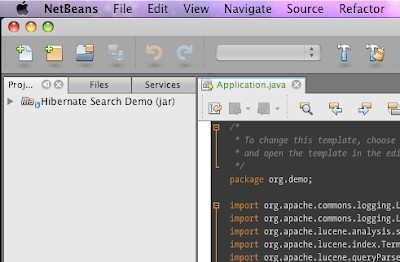
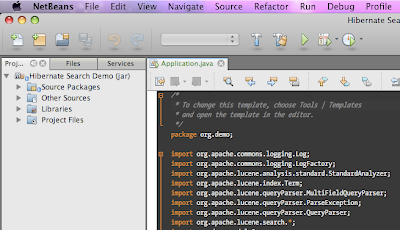
If you are a look and feel freak like me, you will notice that the toolbar is not just right under OS X 10.5, when running with default java 1.6, which is "1.6.0_13". The toolbar does not appear as "unified" and it will sooner or later turn out in to an eye-sore.
The way to work around this is to edit your netbeans.conf and tell netbeans to use JDK 1.5 instead of 1.6 for running. Put the following lines in to netbeans.conf (Probably at /Applications/NetBeans/NetBeans\ 6.7.app/Contents/Resources/NetBeans/etc/netbeans.conf)

netbeans_jdkhome="/System/Library/Frameworks/JavaVM.framework/Versions/1.5.0/Home/"

This will use your 1.5 version of Java, and it gives the right Unified toolbar look to netbeans. You can always set project specific JDK for each project in Netbeans.
So, here are couple of screen shots for comparisons.
1) Running with Jdk 1.6, non-unified
2) Running with Jdk 1.5, unified

If you don't want to edit the netbeans.conf file, just set your default java preference using "Java preferences" dialog in OS X. Select Java SE 5 as your default application Java, and you are all set.

Monday, July 13, 2009

Ubuntu 9.04 on OS X via virtual box

Virtualization and virtual machines are a great concept and it is here to stay. I tried installing virtual box (from Sun) on my OS X 10.5, and the experience had been smooth, smoother and the smoothest. I am running Ubuntu on top of my Mac OS, with full screen enabled. For tips to enable fullscreen, visit this link. Though it was written for vista, applies to other OSs as well.
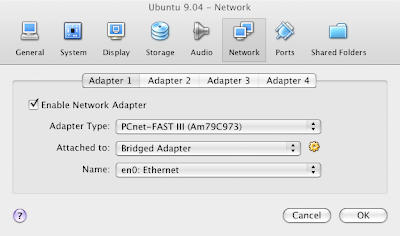
The next step was to bridge the network adapter to use the wired connection en0 on mac.
For this,
  • Shut down your guest OS (ubuntu)
  • Click Network option in the details tab of Sun Virtualbox
  • It will show a small dialog with Adapter1 as selected tab as below
Change the settings to look like what I have in the above picture.

Also, after installing - "Vbox additions" I have noticed the automatic mouse capture and release whenever you move your mouse in and out of the Virtual guest OS window - too cool.
Oh yes, sound works right off the box.

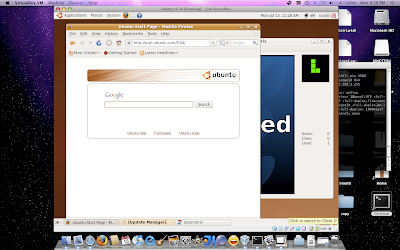
Here is a screen capture of Ubuntu running on OS X

Thursday, July 9, 2009

Chrome OS? what the heck?

Headline in one of India's English news paper read : "Google to challenge Microsoft with new operating system" - as I read the piece I had this strange feeling of mixed emotion that ranged from being pissed-off to starting to LMAO. First off, Chrome OS targeted for netbooks/nettops can't even be called an operating system - it is a shame to the years and years of human labor and hard work involved in developing other great OSs. It may be an operating environment. And god, it is going to be based on chrome? well, who uses chrome? how soon does google think to capture the internet browser market share from IE/Safari and Firefox? - and what is the market share of netbooks? Who even cares? it may be around 5% of the whole computer/mobile device market - I know how many people in India uses netbooks - "0" - that is how many. - Oh well, that is where Google is going to give M$ for a run for its money.
Pissed off both at the Newspaper as well as google's lack of imagination in projecting Chrome OS as the next Microsoft basher....

Wednesday, July 1, 2009

Downloading free software

Life in software development would have sucked without all the free/open tools available from soureforge or code.google.com or even netbeans

But at times your exciting rush to download your favorite tool is cut short by the firewall/proxy server at your work. So, here are two alternatives.

One is source forge mirror that would go under the radar(all source forge projects are indexed and served here)

Another is netbeans FTP sites just in case your firewall prohibits download sites