Showing posts with label java. Show all posts

Tuesday, July 21, 2009

The new Netbeans look on OS X - Part II

Earlier, I had mentioned about the impressive UI improvements for OSX in the latest release of Netbeans( "The new Netbeans look on OS X" )
If you are a look and feel freak like me, you will notice that the toolbar is not just right under OS X 10.5, when running with default java 1.6, which is "1.6.0_13". The toolbar does not appear as "unified" and it will sooner or later turn out in to an eye-sore.
The way to work around this is to edit your netbeans.conf and tell netbeans to use JDK 1.5 instead of 1.6 for running. Put the following lines in to netbeans.conf (Probably at /Applications/NetBeans/NetBeans\ 6.7.app/Contents/Resources/NetBeans/etc/netbeans.conf)

netbeans_jdkhome="/System/Library/Frameworks/JavaVM.framework/Versions/1.5.0/Home/"

This will use your 1.5 version of Java, and it gives the right Unified toolbar look to netbeans. You can always set project specific JDK for each project in Netbeans.
So, here are couple of screen shots for comparisons.
1) Running with Jdk 1.6, non-unified
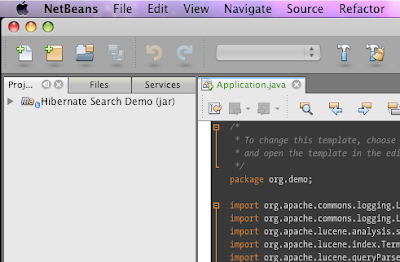
2) Running with Jdk 1.5, unified
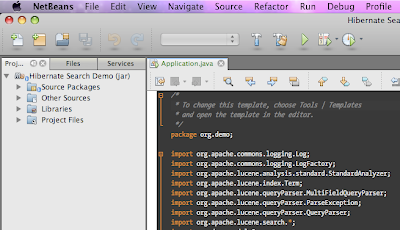
If you don't want to edit the netbeans.conf file, just set your default java preference using "Java preferences" dialog in OS X. Select Java SE 5 as your default application Java, and you are all set.

Friday, November 28, 2008

A tale of three IDEs

I think I should tell a little bit about the environment I am in. I am sure all Windows users can safely ignore everything below.
  • OS X 10.5.5
  • Default Java - java version "1.5.0_16"
  • Also have the latest (and buggy) apple Java 1.6.0_17
IDEVersionProblemFix
Netbeans6.5As soon as I launch, the netbeans icon jumps on the dock and then crashes. No error message on screen.This is due to some but in Apple's Java and updates. To address, you will have to edit file :
Applications/NetBeans/NetBeans 6.5.app/Contents/Resources/NetBeans/
platform9/lib/nbexec
and change
eval ${_NB_PROFILE_CMD} "\"${jdkhome}/bin/java\""
-Djdk.home="\"${jdkhome}\"" -classpath "\"$cp\"" \

$jargs org.netbeans.Main "$args" '&'
change it to:
ARCH_CMD="/usr/bin/arch -i386";
eval ${ARCH_CMD} ${_NB_PROFILE_CMD} "\"${jdkhome}/bin/java\""
-Djdk.home="\"${jdkhome}\"" -classpath "\"$cp\"" \
$jargs org.netbeans.Main "$a
rgs" '&'
Intellij IDEA8,7.xCompiler internal error. Process terminated with exit code 139 - This occurs whenever you try to build your projectNot sure how this gets fixed by my work-around, but all you have to do is : launch compiler properties- Intellij IDEA->Preferences..->Compiler->Java Compiler and put a valid option in "Additional command line parameters - for ex: -verbose
EclipseGanymedeNone so far

The fix for Netbeans issue is specified in netbeans issues
However, I had to figure out fix for issue with IDEA through trial and error(accidentally)
Screenshots for fixes mentioned above.
Netbeans :


IDEA


Thursday, April 24, 2008

Does Blogger(blogspot) support code formatting?

Here are some attempts..
This is using format my source code for blogger utility.

<?xml version="1.0" encoding="UTF-8"?>
<web-app xmlns="http://java.sun.com/xml/ns/javaee"
xmlns:xsi="http://www.w3.org/2001/XMLSchema-instance"
xsi:schemaLocation="http://java.sun.com/xml/ns/javaee
http://java.sun.com/xml/ns/javaee/web-app_2_5.xsd"
version="2.5">
<filter>
<filter-name>struts2</filter-name>
<filter-class>org.apache.struts2.dispatcher.FilterDispatcher</filter-class>
</filter>
<filter-mapping>
<filter-name>struts2</filter-name>
<url-pattern>/*</url-pattern>
</filter-mapping>

</web-app>


Some trial with an excellent web based tool provided at http://www.manoli.net/csharpformat/

I copied the CSS given by this site to my blogger template.
The results are good. But needs tweaking as default blogger linespacing is kind of messed. Then I tweaked it a little bit and mixed with the pre tag in above code formatting style. Works to certain extend. But I am not satisfied with the output. May be I need to change my Blog's basic template to a wider one to accommodate the source code. Thats for later!!!

Friday, December 7, 2007

Most beautiful Swing look and feel

Its not Nimbus. Its not JGoodies or Substance. It is Synthetica - white vision look and feel.
Its plain beautiful and usable. I appled this to SQuirreL-SQL client and it is look so awesome that I had to blog about it. Here is a screenshot. Only gripe is that it has Vista folder icons for tree nodes.

Thursday, November 8, 2007

Work in progress - my very rich swing application - part 5

Yet another close look:


Features added :
  • Rendering proper table header icon/color while sorting
  • Initial stages of OFX import
  • iTunes look
I am also working in building "leopard" like toolbar buttons. Once that is added, the application will be OS X 10.5 ready. But not sure when Apple is planning to give out Java 6 for OS X 10.5. I happen to be one of the lucky guys with Java 6 developer preview.

Saturday, November 3, 2007

Work in progress - my very rich swing application - part 4

Recently, I shifted focus from the "swing" factor. As I was building and polishing the application, I realized that most of my expenses are covered using my bank card. So, if the application just accepts journal entries, it is useful only to students and kids.
So, I started learning about the bank statement formats - yes, OFX - the open financial exchange format. The format is in SGML to my dismay - and there is NO SGML Parser in Java. SGML is a loosely structured but complex language to express data - and XML has replaced it in most fields. 
But anyway, I need to parse OFX. So, I turned to ANTLR - the excellent parser generator. I am in the initial stages of learning curve, but it is really interesting and simple. I think any student who is learning compiler theory should use ANTLR as the learning tool. Oh, coming back to my application - right now, the focus is on parsing only bank statements.

Friday, October 26, 2007

Leopard - No Java 6

So, I went, stood in line, got T-Shirt and checked out the latest and greatest OS X - Leopard at the Providence Apple store.
Ran a terminal and typed java -version.
Sad, but true, it returned version 1.5.
The java in OS X is officially still at 5, and no idea when apple will release Java 6. Btw, leopard looks way cool and pretty fast just like Tiger.

Monday, September 17, 2007

A simple plugin framework in Java

As part of my hobby project, I thought of coming up with some sort of a plug-in mechanism. Though I have worked in a "plug and play"-like J2EE project, I have never done a desktop application with plug-in nature.
I like the way plug-ins work in eclipse. Just extract your plug-ins in to a specific folder. So, my application also would have a similar plug-in mechanism.
Following is the way I have implemented the plug-in manager:

Get to plugins directory
For each file in plugins directory
If file ends with ".jar"
See if there is a plugin-manifest.xml inside the jar
If found read the XML and get data about the Plugin
Save plugin data to a list/map for future use
Add the jar to current classpath as plugin may be used.
End if
End if
End for

Tuesday, September 11, 2007

Putting together a modern UI using Java swing.

I had been working a lot with Java2D and graphics in my free time. So, when I thought of a little utility application for myself, I thought of applying all sorts of "Swing hacks" that I came across so far. Thanks to swing gurus like 'Roamin Guy' and 'John Lipsky', I am able to build somewhat beautiful UI. A lot of time is being spent in putting all the components together and testing while I am losing focus on the real task in my hand - building my little utility application. Hm.. some day I will build it. Here is a screenshot of the work so far for now.

Java has come a very long way in terms of UI and graphics performance. I am only an entry level programmer when it comes to graphics and swing painting. But this application is running pretty smooth on both windows and OS X and it only can be attributed to Java 6's performance.

Monday, February 26, 2007

Pimpin' Netbeans UI in Linux (laptop)

This assumes you know how to do stuff around Netbeans and Linux.
I have the following in my Laptop.
Ubuntu Dapper Drake - Running GNOME 2.14 and Sun JDK 6.
Default X11 font rendering sucks a little. So, I applied sub-pixel smoothing patches.
I downloaded and started using Netbeans 5.5, which is pretty good. But by default it has the "Metal" look and feel, which is not very exciting. So, I decided to make Netbeans look "better".

I tried enabling the GTKLookAndFeel so that it looks native. But I must confess, the Java font rendering on GTKLookAndFeel is just plain horrible. My next choice for look and fee was JGoodies. JGoodies is a pretty neat and simple Look and feel library.

So, first you need JDK6 for better UI and Font rendering.
Download JGoodies look and feel and place the looks-2.1.3.jar in to your netbeans-5.5/core folder.

Now, edit your netbeans-5.5/etc/netbeans.conf file so that your netbeans_default_options value looks like :

netbeans_default_options="-J-Xms32m -J-Xmx384m -J-XX:PermSize=32m -J-XX:MaxPermSize=384m -J-Dswing.aatext=true -J-Xverify:none -J-DPlastic.defaultTheme=ExperienceBlue -J-DmarkContentBorders=true -laf com.jgoodies.looks.plastic.PlasticXPLookAndFeel -J-Dapple.laf.useScreenMenuBar=true"

Here, important lines are
  • J-DPlastic.defaultTheme=ExperienceBlue - this is a good theme on eyes
  • -laf com.jgoodies.looks.plastic.PlasticXPLookAndFeel - XP like look and feel.
  • -J-Dswing.aatext=true - Force font anti-aliasing options.

Start your netbeans with these options and it will look much better. But the tab headers are grayish and they look really horrible:

So, here is a fix for that. Download the tab header netbeans module from this site, and install it in your netbeans - by the following steps.

From Tools -> Module Manager, Click update button.
In Update center wizard, select Install manually selected downloads, and add and install the downloaded nbm module.


Restart your netbeans, and it should look pretty good. ( Here, I have included my Ubuntu Menu text to show how the font still sucks a bit)


Now, for editor font, get "Consolas" ( it is a Vista font so get it by hook or crook) and use it as your editor font. It looks nice - as nice as Apple's Monaco.