Showing posts with label OS X. Show all posts

Tuesday, July 21, 2009

The new Netbeans look on OS X - Part II

Earlier, I had mentioned about the impressive UI improvements for OSX in the latest release of Netbeans( "The new Netbeans look on OS X" )
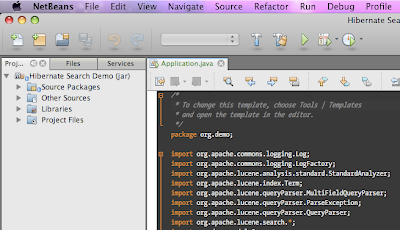
If you are a look and feel freak like me, you will notice that the toolbar is not just right under OS X 10.5, when running with default java 1.6, which is "1.6.0_13". The toolbar does not appear as "unified" and it will sooner or later turn out in to an eye-sore.
The way to work around this is to edit your netbeans.conf and tell netbeans to use JDK 1.5 instead of 1.6 for running. Put the following lines in to netbeans.conf (Probably at /Applications/NetBeans/NetBeans\ 6.7.app/Contents/Resources/NetBeans/etc/netbeans.conf)

netbeans_jdkhome="/System/Library/Frameworks/JavaVM.framework/Versions/1.5.0/Home/"

This will use your 1.5 version of Java, and it gives the right Unified toolbar look to netbeans. You can always set project specific JDK for each project in Netbeans.
So, here are couple of screen shots for comparisons.
1) Running with Jdk 1.6, non-unified
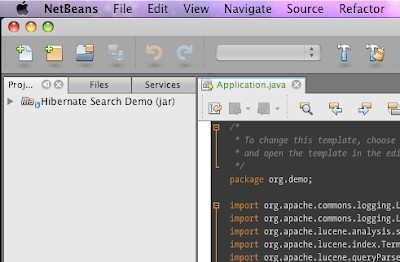
2) Running with Jdk 1.5, unified
If you don't want to edit the netbeans.conf file, just set your default java preference using "Java preferences" dialog in OS X. Select Java SE 5 as your default application Java, and you are all set.

Monday, July 13, 2009

Ubuntu 9.04 on OS X via virtual box

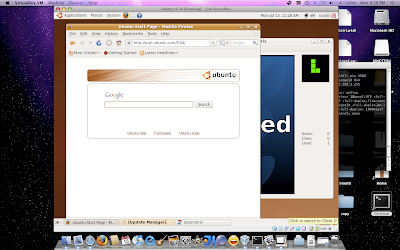
Virtualization and virtual machines are a great concept and it is here to stay. I tried installing virtual box (from Sun) on my OS X 10.5, and the experience had been smooth, smoother and the smoothest. I am running Ubuntu on top of my Mac OS, with full screen enabled. For tips to enable fullscreen, visit this link. Though it was written for vista, applies to other OSs as well.
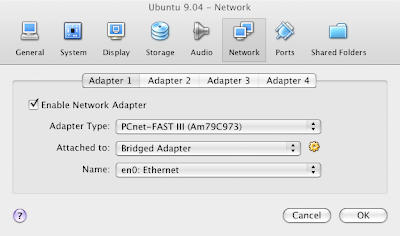
The next step was to bridge the network adapter to use the wired connection en0 on mac.
For this,
  • Shut down your guest OS (ubuntu)
  • Click Network option in the details tab of Sun Virtualbox
  • It will show a small dialog with Adapter1 as selected tab as below
Change the settings to look like what I have in the above picture.

Also, after installing - "Vbox additions" I have noticed the automatic mouse capture and release whenever you move your mouse in and out of the Virtual guest OS window - too cool.
Oh yes, sound works right off the box.

Here is a screen capture of Ubuntu running on OS X

Thursday, March 19, 2009

The new Netbeans look on OS X

I keep a tab on the IDE scene. So, I downloaded the latest development build of Netbeans and lo!
The UI look on OS X - is by far the best I have seen for Java IDEs
I have not used it enough so, I can not tell you about how it feels. Look-wise it rocks.
So, if you run OS X and you been complaining about the Netbeans look, it is the time to play with the development build. Go ahead

Friday, November 28, 2008

A tale of three IDEs

I think I should tell a little bit about the environment I am in. I am sure all Windows users can safely ignore everything below.
  • OS X 10.5.5
  • Default Java - java version "1.5.0_16"
  • Also have the latest (and buggy) apple Java 1.6.0_17
IDEVersionProblemFix
Netbeans6.5As soon as I launch, the netbeans icon jumps on the dock and then crashes. No error message on screen.This is due to some but in Apple's Java and updates. To address, you will have to edit file :
Applications/NetBeans/NetBeans 6.5.app/Contents/Resources/NetBeans/
platform9/lib/nbexec
and change
eval ${_NB_PROFILE_CMD} "\"${jdkhome}/bin/java\""
-Djdk.home="\"${jdkhome}\"" -classpath "\"$cp\"" \

$jargs org.netbeans.Main "$args" '&'
change it to:
ARCH_CMD="/usr/bin/arch -i386";
eval ${ARCH_CMD} ${_NB_PROFILE_CMD} "\"${jdkhome}/bin/java\""
-Djdk.home="\"${jdkhome}\"" -classpath "\"$cp\"" \
$jargs org.netbeans.Main "$a
rgs" '&'
Intellij IDEA8,7.xCompiler internal error. Process terminated with exit code 139 - This occurs whenever you try to build your projectNot sure how this gets fixed by my work-around, but all you have to do is : launch compiler properties- Intellij IDEA->Preferences..->Compiler->Java Compiler and put a valid option in "Additional command line parameters - for ex: -verbose
EclipseGanymedeNone so far

The fix for Netbeans issue is specified in netbeans issues
However, I had to figure out fix for issue with IDEA through trial and error(accidentally)
Screenshots for fixes mentioned above.
Netbeans :


IDEA


Monday, September 8, 2008

State of clientProperty in OS X Java 1.6

Started looking at my pet Java Swing application - jSpent. This time the attempt was to create a leopard-like unified toolbar. I was so excited to see that there is a clientProperty "apple.awt.brushMetalLook" - By setting this as : 
myFrame.getRootPane().putClientProperty("apple.awt.brushMetalLook", Boolean.TRUE);
This will cause OS X to render the title bar in the unified style. But unfortunately, there is no good clientProperty setting for the toolbar itself. So we end up with a light gray window title bar. The toolbar appears like a gray box, painted in different color. Not sure if this is a bug in Apples Java. However, I had to again resort to pick and choose and paint my own gradient just below the window title bar to make it look "Unified". So, here is the output. 


But oh well, I need to repaint the toolbar in ligher gradient when the window goes out of focus.. hm.. that's too much to do!

Thursday, August 14, 2008

Why OS X is sweet..

Since I am a guy who moved from MS Windows/GNOME world to OS X, I used to miss the "start menu". But soon I discovered how handy the spotlight search is.
I started discovering interesting features and applications as I continued to use mac. For example, for ripping a DVD, we have Handbreak. For video format conversion there is iSquint. But how on earth would you remember these names when you need it. I installed iSquint and one day I was racking my brain to find what was the name of that application that would convert one video format to another in Mac. At last, I had to google it though I had the software on my desktop. Then I thought hey! the spotlight must have a feature to tag an application with whatever keywords you want. And yes! there is.
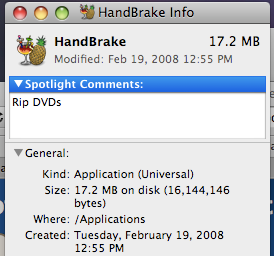
Select the application from Application folder, right click and goto info dialog. There is a top text area called "Spotlight comments" enter your keywords. Now, if you type just the key words in plain English on spotlight, it lists the application that will match your keywords..awesome!!

So here are the screenshots with what I did for Handbreak. Right click and invoke the info dialog. Enter the key word:


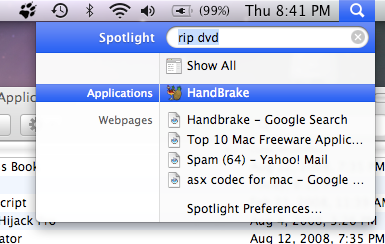
Now when you want to rip a DVD ( hey its illegal!), type rip DVD on your spotlight search textbox and here is what happens


This is far far better from searching through your program in a startmenu with 100 different shortcuts. And may be its just me, I like keyboard short cuts ( apple + space bar for spotlight search) and a little typing.

Thursday, November 8, 2007

Work in progress - my very rich swing application - part 5

Yet another close look:


Features added :
  • Rendering proper table header icon/color while sorting
  • Initial stages of OFX import
  • iTunes look
I am also working in building "leopard" like toolbar buttons. Once that is added, the application will be OS X 10.5 ready. But not sure when Apple is planning to give out Java 6 for OS X 10.5. I happen to be one of the lucky guys with Java 6 developer preview.

Friday, October 26, 2007

Leopard - No Java 6

So, I went, stood in line, got T-Shirt and checked out the latest and greatest OS X - Leopard at the Providence Apple store.
Ran a terminal and typed java -version.
Sad, but true, it returned version 1.5.
The java in OS X is officially still at 5, and no idea when apple will release Java 6. Btw, leopard looks way cool and pretty fast just like Tiger.

Saturday, October 13, 2007

Where is leopard?

Where is Apple's new version of OS X? Its been a while since I heard anything about it and I eagerly check my regular Mac web resources for any updates. Looks like Apple is getting it ready - as per the last announcement, its release has to happen somewhere this month. 
No signs, whatever!
Anyway, I am not going to install Leopard unless it is absolutely necessary for latest Java 6. OS X tiger is the ultimate operating system on Desktop that one can imagine.

Tuesday, September 11, 2007

Putting together a modern UI using Java swing.

I had been working a lot with Java2D and graphics in my free time. So, when I thought of a little utility application for myself, I thought of applying all sorts of "Swing hacks" that I came across so far. Thanks to swing gurus like 'Roamin Guy' and 'John Lipsky', I am able to build somewhat beautiful UI. A lot of time is being spent in putting all the components together and testing while I am losing focus on the real task in my hand - building my little utility application. Hm.. some day I will build it. Here is a screenshot of the work so far for now.

Java has come a very long way in terms of UI and graphics performance. I am only an entry level programmer when it comes to graphics and swing painting. But this application is running pretty smooth on both windows and OS X and it only can be attributed to Java 6's performance.