Showing posts with label unified. Show all posts

Tuesday, July 21, 2009

The new Netbeans look on OS X - Part II

Earlier, I had mentioned about the impressive UI improvements for OSX in the latest release of Netbeans( "The new Netbeans look on OS X" )
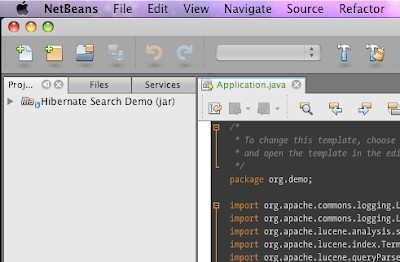
If you are a look and feel freak like me, you will notice that the toolbar is not just right under OS X 10.5, when running with default java 1.6, which is "1.6.0_13". The toolbar does not appear as "unified" and it will sooner or later turn out in to an eye-sore.
The way to work around this is to edit your netbeans.conf and tell netbeans to use JDK 1.5 instead of 1.6 for running. Put the following lines in to netbeans.conf (Probably at /Applications/NetBeans/NetBeans\ 6.7.app/Contents/Resources/NetBeans/etc/netbeans.conf)

netbeans_jdkhome="/System/Library/Frameworks/JavaVM.framework/Versions/1.5.0/Home/"

This will use your 1.5 version of Java, and it gives the right Unified toolbar look to netbeans. You can always set project specific JDK for each project in Netbeans.
So, here are couple of screen shots for comparisons.
1) Running with Jdk 1.6, non-unified
2) Running with Jdk 1.5, unified
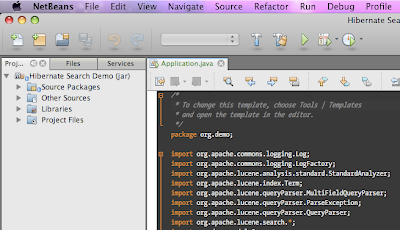
If you don't want to edit the netbeans.conf file, just set your default java preference using "Java preferences" dialog in OS X. Select Java SE 5 as your default application Java, and you are all set.

Monday, September 8, 2008

State of clientProperty in OS X Java 1.6

Started looking at my pet Java Swing application - jSpent. This time the attempt was to create a leopard-like unified toolbar. I was so excited to see that there is a clientProperty "apple.awt.brushMetalLook" - By setting this as : 
myFrame.getRootPane().putClientProperty("apple.awt.brushMetalLook", Boolean.TRUE);
This will cause OS X to render the title bar in the unified style. But unfortunately, there is no good clientProperty setting for the toolbar itself. So we end up with a light gray window title bar. The toolbar appears like a gray box, painted in different color. Not sure if this is a bug in Apples Java. However, I had to again resort to pick and choose and paint my own gradient just below the window title bar to make it look "Unified". So, here is the output. 


But oh well, I need to repaint the toolbar in ligher gradient when the window goes out of focus.. hm.. that's too much to do!