Thursday, August 14, 2008

Why OS X is sweet..

Since I am a guy who moved from MS Windows/GNOME world to OS X, I used to miss the "start menu". But soon I discovered how handy the spotlight search is.
I started discovering interesting features and applications as I continued to use mac. For example, for ripping a DVD, we have Handbreak. For video format conversion there is iSquint. But how on earth would you remember these names when you need it. I installed iSquint and one day I was racking my brain to find what was the name of that application that would convert one video format to another in Mac. At last, I had to google it though I had the software on my desktop. Then I thought hey! the spotlight must have a feature to tag an application with whatever keywords you want. And yes! there is.
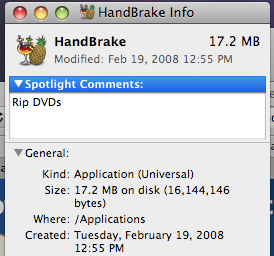
Select the application from Application folder, right click and goto info dialog. There is a top text area called "Spotlight comments" enter your keywords. Now, if you type just the key words in plain English on spotlight, it lists the application that will match your keywords..awesome!!

So here are the screenshots with what I did for Handbreak. Right click and invoke the info dialog. Enter the key word:

Now when you want to rip a DVD ( hey its illegal!), type rip DVD on your spotlight search textbox and here is what happens
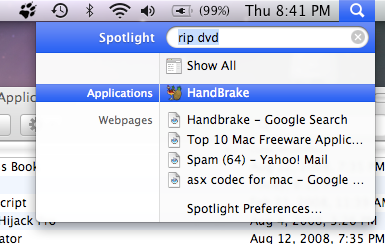

This is far far better from searching through your program in a startmenu with 100 different shortcuts. And may be its just me, I like keyboard short cuts ( apple + space bar for spotlight search) and a little typing.

Friday, July 18, 2008

Yet another test for syntax highlighting

This time the code is a piece of HTML created using Vim's Syntax->Convert to HTML feature.
/**
* @author ranjith
* @date May 13, 2008
* JPA Persistance in action
*/
public class MessageJPATest {
public static void main(String[] args) {
EntityManagerFactory emf = Persistence.createEntityManagerFactory("jpa-learn");
EntityManager em = emf.createEntityManager();
EntityTransaction tx = em.getTransaction();
tx.begin();

This seems to be working? Yes - only when your Vim color theme matches your blogger background color.
Plus, too much work to paste code snippets.

Thursday, April 24, 2008

Does Blogger(blogspot) support code formatting?

Here are some attempts..
This is using format my source code for blogger utility.

<?xml version="1.0" encoding="UTF-8"?>
<web-app xmlns="http://java.sun.com/xml/ns/javaee"
xmlns:xsi="http://www.w3.org/2001/XMLSchema-instance"
xsi:schemaLocation="http://java.sun.com/xml/ns/javaee
http://java.sun.com/xml/ns/javaee/web-app_2_5.xsd"
version="2.5">
<filter>
<filter-name>struts2</filter-name>
<filter-class>org.apache.struts2.dispatcher.FilterDispatcher</filter-class>
</filter>
<filter-mapping>
<filter-name>struts2</filter-name>
<url-pattern>/*</url-pattern>
</filter-mapping>

</web-app>


Some trial with an excellent web based tool provided at http://www.manoli.net/csharpformat/

I copied the CSS given by this site to my blogger template.
The results are good. But needs tweaking as default blogger linespacing is kind of messed. Then I tweaked it a little bit and mixed with the pre tag in above code formatting style. Works to certain extend. But I am not satisfied with the output. May be I need to change my Blog's basic template to a wider one to accommodate the source code. Thats for later!!!